

Browser extensions can be incredibly useful — until they’re not. If you’ve ever tried using an extension to extract or save WhatsApp contacts, this might sound familiar:
✅ It worked fast at first.
❌ Then, your browser slowed down.
❌ WhatsApp Web started glitching.
❌ Strange permission requests began popping up.
In this blog, we’ll explore the hidden risks of using browser extensions for WhatsApp, and a better, safer alternative.
Why People Use Extensions for WhatsApp
Many marketers, business owners, and sales teams use WhatsApp Web to engage with leads. The problem? Saving each new contact manually is time-consuming.
Extensions promise a shortcut — extract unknown numbers, save them, and organize your leads in minutes. Sounds perfect, right?
But most people don’t realize what they’re giving up in exchange for that speed.
The Risks of Using WhatsApp Browser Extensions

1. Privacy Invasion
Most extensions request access to “read and change data on all websites you visit.” That means they can potentially:
- Read your WhatsApp messages
- Track your browsing behavior
- Access sensitive business or personal data
This is especially risky if the extension was not built by a verified developer.
2. Unstable Performance
Extensions often conflict with how WhatsApp Web functions. You might experience:
- Random logouts
- Slower load times
- Glitches in your chat interface
- Problems when opening media or links
3. Security Red Flags
Some extensions aren’t just invasive — they’re dangerous. There have been cases where malicious extensions:
- Inject ads or trackers
- Steal cookies or login sessions
- Create vulnerabilities that hackers can exploit
4. Violation of WhatsApp’s Terms
WhatsApp doesn’t officially support third-party extensions that alter its interface or extract data. Using such tools might risk temporary or permanent bans — especially for business accounts.
A Safer Alternative: Meet Numbo
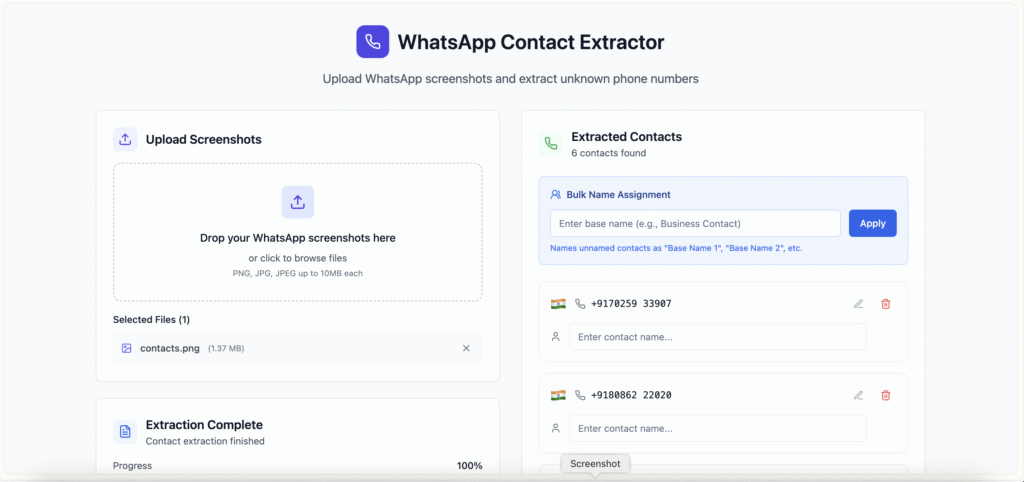
If you’re looking for a secure way to save unsaved WhatsApp contacts, Numbo is built for you.
- No extensions or installs
- No access to your messages or device
- Works directly from your browser — using screenshots
- Lets you identify, label, and export WhatsApp Web contacts in a few clicks
- Your data stays fully in your control
Visit www.numbo.cc to try it now.
Final Thoughts
Browser extensions might seem like the easy way to manage WhatsApp contacts, but the risks outweigh the rewards. From privacy issues to security threats, you’re putting your business and data in danger.
There’s a better way to manage your leads — without compromising on trust or transparency.
Numbo gives you a safer, smarter, and more reliable way to handle WhatsApp contact extraction — no plugins, no surprises.
Leave a Reply